SIS Shift management
Tablet
B2B
Workforce management
Enterprise UX
Offline-first design
Research
Testing
Impact
Impact
Six months after launch, the client reported measurable improvements in operational efficiency and reporting accuracy.
Six months after launch, the client reported measurable improvements in operational efficiency and reporting accuracy.
100% reduction in record tampering
100% reduction in record tampering
Digital attendance tracking prevented guards from falsifying records.
Digital attendance tracking prevented guards from falsifying records.
50% increase in unit adoption
50% increase in unit adoption
Security officers who adopted the system began assisting others during rollout, accelerating adoption across operational units.
Security officers who adopted the system began assisting others during rollout, accelerating adoption across operational units.
70% reduction in customer complaints
70% reduction in customer complaints
Security officers were able to identify staffing shortages earlier and resolve them before impacting clients.
Security officers were able to identify staffing shortages earlier and resolve them before impacting clients.
Improvement in user satisfaction
Improvement in user satisfaction
Officers reported that daily shift management tasks were significantly easier compared to managing paper registers.
Officers reported that daily shift management tasks were significantly easier compared to managing paper registers.
Project introduction
Project introduction
SIS Group Enterprise is a private security services company operating across India, Australia, and, New Zealand, deploying security personnel to banks, hotels, residential complexes, and corporate offices.
At each site, security officers are responsible for managing guards, assigning them to posts, tracking attendance, and generating reports for clients.
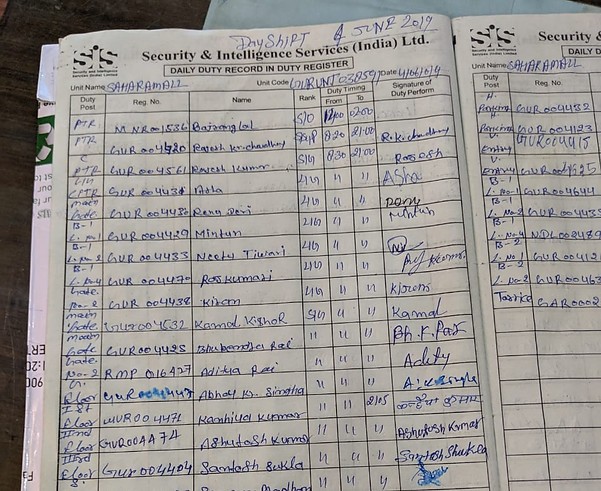
Before this project, these responsibilities were managed entirely through paper registers. Officers manually recorded shift assignments, attendance, and incidents throughout the day. At the end of each shift, they reviewed these logs to produce reports for clients.
This paper-based process created significant operational challenges, particularly as officers were often responsible for 20–25 guards across multiple locations.
To improve operational visibility and reporting accuracy, SIS wanted to introduce a tablet-based shift management application for security officers.
SIS Group Enterprise is a private security services company operating across India, Australia, and, New Zealand, deploying security personnel to banks, hotels, residential complexes, and corporate offices.
At each site, security officers are responsible for managing guards, assigning them to posts, tracking attendance, and generating reports for clients.
Before this project, these responsibilities were managed entirely through paper registers. Officers manually recorded shift assignments, attendance, and incidents throughout the day. At the end of each shift, they reviewed these logs to produce reports for clients.
This paper-based process created significant operational challenges, particularly as officers were often responsible for 20–25 guards across multiple locations.
To improve operational visibility and reporting accuracy, SIS wanted to introduce a tablet-based shift management application for security officers.
The Problem
The Problem
The paper register workflow created several operational and reporting issues:
Attendance records were easily manipulated
Attendance records were easily manipulated
Guards could alter register entries to falsify attendance, making it difficult to verify who had actually worked a shift.
Guards could alter register entries to falsify attendance, making it difficult to verify who had actually worked a shift.
Staff shortages were difficult to track
Staff shortages were difficult to track
Security officers had limited visibility into which posts were understaffed, especially when managing multiple shifts and locations.
Security officers had limited visibility into which posts were understaffed, especially when managing multiple shifts and locations.
Client reporting required time-consuming manual review
Client reporting required time-consuming manual review
Generating shift reports required officers to review multiple registers and reconcile attendance records.
Generating shift reports required officers to review multiple registers and reconcile attendance records.
Customer complaints were increasing
Customer complaints were increasing
Clients frequently reported missing guards or inaccurate reporting, which impacted service reliability.
Clients frequently reported missing guards or inaccurate reporting, which impacted service reliability.
My role
I worked as the UX Designer on this project alongside a visual designer, collaborating closely with the client’s product management and development teams.
My responsibilities included:

Understanding product requirements and operational workflows
Understanding product requirements and operational workflows
Guards could alter register entries to falsify attendance, making it difficult to verify who had actually worked a shift.
Guards could alter register entries to falsify attendance, making it difficult to verify who had actually worked a shift.

Designing and validating solutions
Designing and validating solutions
Guards could alter register entries to falsify attendance, making it difficult to verify who had actually worked a shift.
Guards could alter register entries to falsify attendance, making it difficult to verify who had actually worked a shift.

Delivering production-ready designs
Delivering production-ready designs
Guards could alter register entries to falsify attendance, making it difficult to verify who had actually worked a shift.
Guards could alter register entries to falsify attendance, making it difficult to verify who had actually worked a shift.
Beyond execution, I also contributed to several key product decisions:
• Proposed capturing punch-in and punch-out events using the tablet camera to prevent attendance tampering
• Advocated for simplifying the product by separating complex shift configuration from daily shift management tasks
• Challenged the initial assumption that the product should be completely self-explanatory, securing agreement for minimal user training on complex workflows
Beyond execution, I also contributed to several key product decisions:
• Proposed capturing punch-in and punch-out events using the tablet camera to prevent attendance tampering
• Advocated for simplifying the product by separating complex shift configuration from daily shift management tasks
• Challenged the initial assumption that the product should be completely self-explanatory, securing agreement for minimal user training on complex workflows
Users & Research
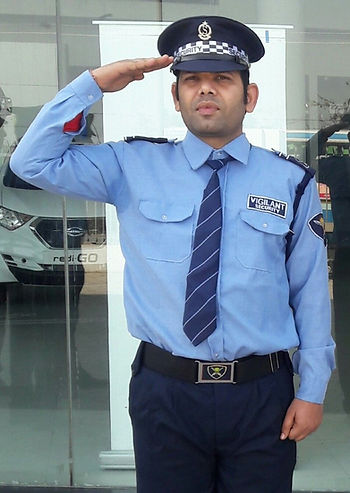
Security officer managing 20–25 guards across multiple branches, non-technical, beginner-level English
His responsibilities include:
• Assigning guards to posts for each shift
• Managing last-minute absences or shortages
• Generating shift reports for the client
Before the application, Rajesh relied entirely on paper registers to manage these tasks.
Key insights
Familiar mobile interactions worked well
• Most officers regularly used WhatsApp and Facebook on their smartphones.
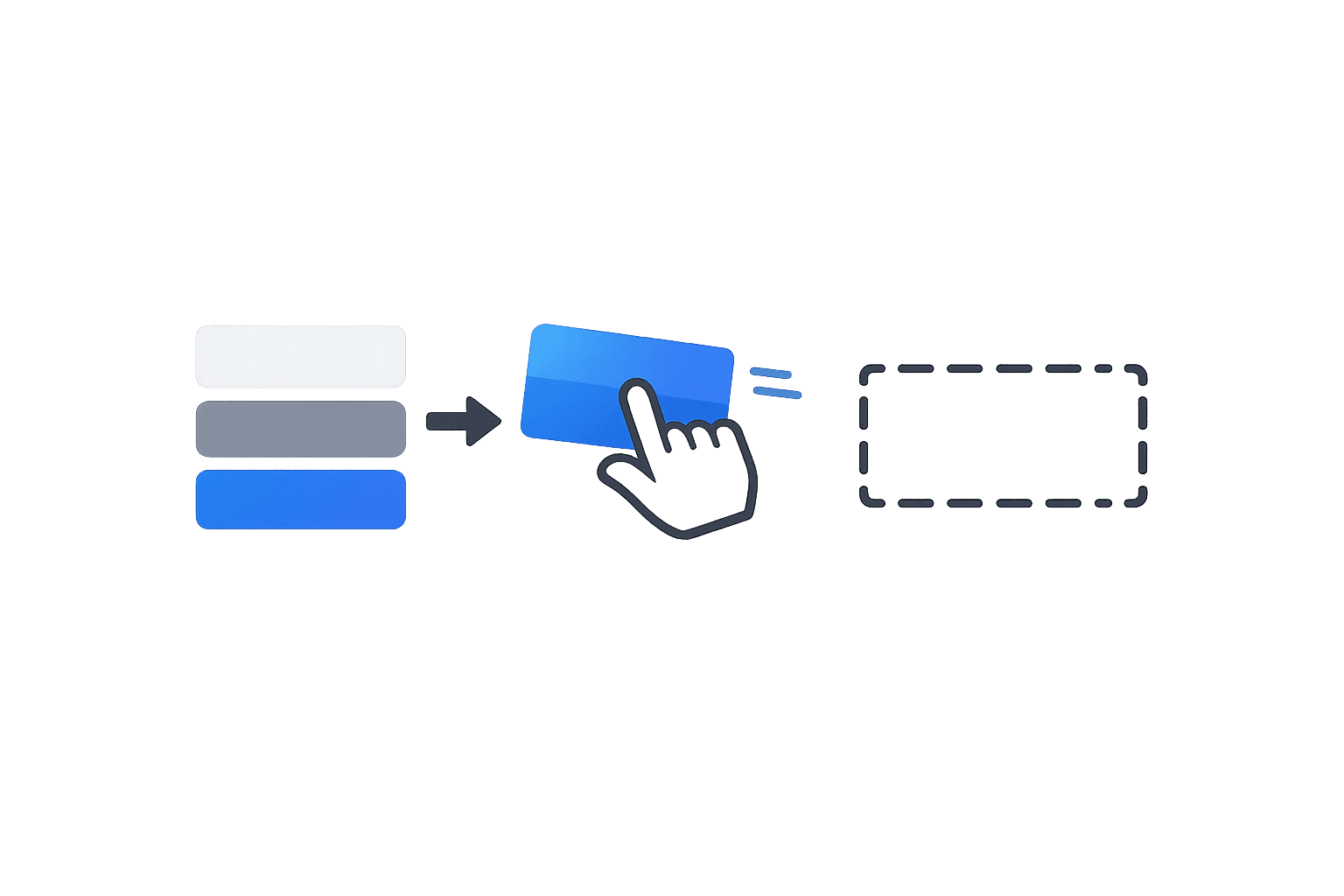
• During prototype testing, users were able to understand drag-and-drop interactions quickly, especially when assigning guards to posts.
• This indicated we could rely on visual manipulation instead of form-heavy workflows.
Text input was slow and error-prone
• Typing on an English keyboard was difficult for many users.
• Tasks that required filling out form fields significantly slowed down the workflow and increased errors.
• This suggested the interface should minimize typing wherever possible.
Users understood task-specific English terminology
Although overall literacy levels were low, users recognized words related to their daily work such as:
• Shifts
• Vacancies
• Posts
This meant an English interface could work if vocabulary remained tightly tied to their domain.
Design challenges
Several constraints significantly shaped the design approach.

Low digital literacy
Many users had never used enterprise software before. The interface had to rely on simple, learnable interactions.

No internet access
Some security officers operate in remote locations with no connectivity.
The system needed to support offline workflows with delayed data synchronization.

English-only interface
The client insisted the application launch in English with no localization planned.

No training budget
The product team initially expected the application to be completely self-explanatory.
Through discussions with the client, we secured agreement for minimal training focused on complex tasks.

-me at the moment
Product strategy
Based on research and constraints, we made several strategic design decisions.
Separate complex and simple workflows
Separate complex and simple workflows
Originally, the client expected security officers to both:
• Define shift structures
• Assign guards to posts
Research suggested this would be too complex for most users.
We restructured the system so that:
• Advanced users create shifts and post structures
• Security officers only assign guards to existing posts
This reduced cognitive load for daily users.
Originally, the client expected security officers to both:
• Define shift structures
• Assign guards to posts
Research suggested this would be too complex for most users.
We restructured the system so that:
• Advanced users create shifts and post structures
• Security officers only assign guards to existing posts
This reduced cognitive load for daily users.
Minimize text-heavy interactions
Minimize text-heavy interactions
Because typing was difficult, we reduced reliance on forms and instead used:
• Tap selections
• Drag-and-drop assignments
• Pre-filtered employee lists
Because typing was difficult, we reduced reliance on forms and instead used:
• Tap selections
• Drag-and-drop assignments
• Pre-filtered employee lists
Support offline-first workflows
Support offline-first workflows
Core tasks were designed to function without internet access.
Data such as attendance and shift updates would be stored locally on the device and synchronized later when connectivity became available.
Core tasks were designed to function without internet access.
Data such as attendance and shift updates would be stored locally on the device and synchronized later when connectivity became available.
Prevent attendance tampering
Prevent attendance tampering
Paper registers allowed guards to falsify attendance records.
To address this, I proposed capturing punch-in and punch-out events using the tablet camera, creating a verifiable digital record tied to the shift report.
Paper registers allowed guards to falsify attendance records.
To address this, I proposed capturing punch-in and punch-out events using the tablet camera, creating a verifiable digital record tied to the shift report.
Final designs
Final designs
The final system allowed security officers to manage shifts through a tablet interface designed for simplicity and clarity.
The final system allowed security officers to manage shifts through a tablet interface designed for simplicity and clarity.
Employees
Employees
Description
Description
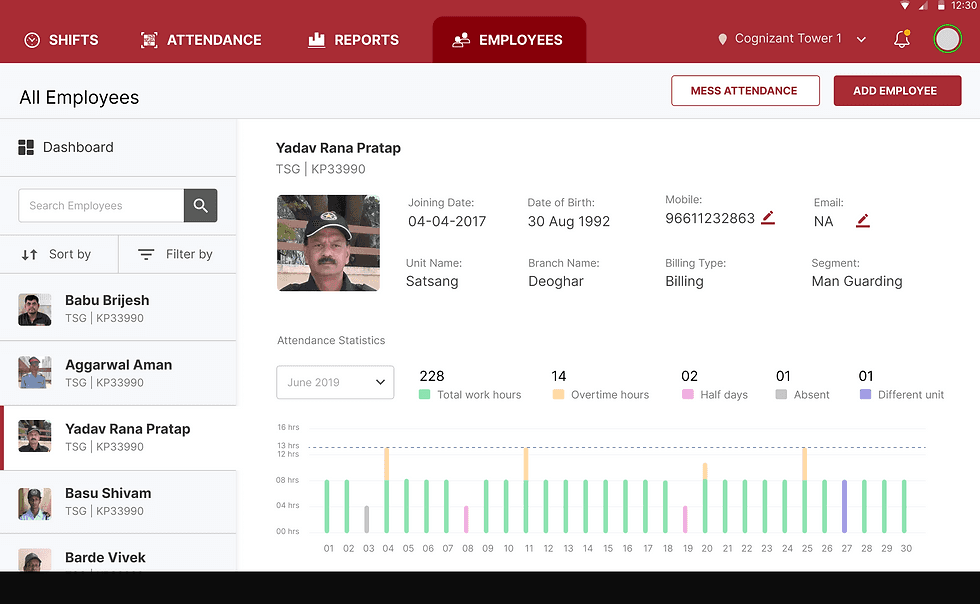
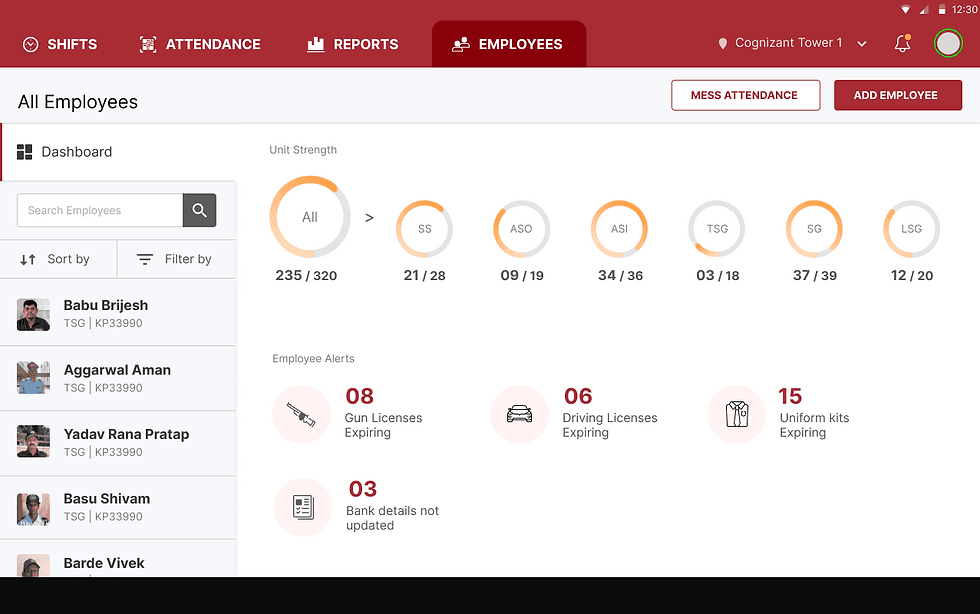
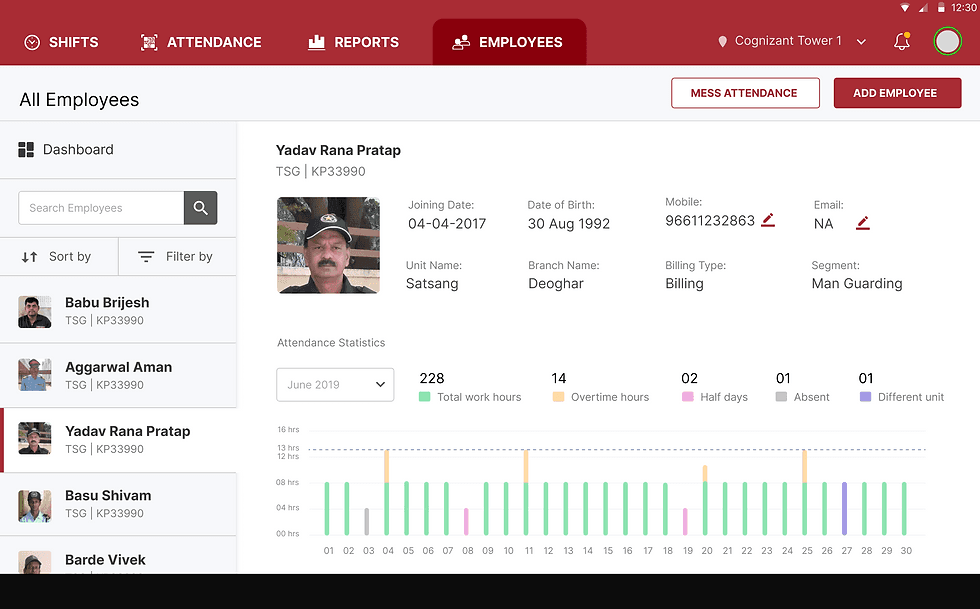
The Employees section provides security officers with a quick overview of their workforce and access to individual employee records. Since officers manage 20–25 guards across multiple locations, the screen was designed to support both high-level monitoring and quick access to employee details.
Key design decisions
• Dashboard first: The landing view surfaces staffing strength and operational alerts so officers can immediately identify shortages or compliance issues without opening individual records.
• Visual staffing indicators: Circular charts show staffing levels across roles, allowing officers to quickly understand workforce distribution at a glance instead of reviewing lists.
• Persistent employee list: The left-side panel keeps the full employee list visible so officers can quickly switch between profiles without navigating away from the dashboard.
• Photo-based identification: Employee photos were prioritized because officers often recognize guards visually rather than by ID numbers.
• Visual attendance summary: Attendance statistics are displayed as a chart to help officers quickly identify absences or overtime patterns without reviewing manual logs.
The Employees section provides security officers with a quick overview of their workforce and access to individual employee records. Since officers manage 20–25 guards across multiple locations, the screen was designed to support both high-level monitoring and quick access to employee details.
Key design decisions
• Dashboard first: The landing view surfaces staffing strength and operational alerts so officers can immediately identify shortages or compliance issues without opening individual records.
• Visual staffing indicators: Circular charts show staffing levels across roles, allowing officers to quickly understand workforce distribution at a glance instead of reviewing lists.
• Persistent employee list: The left-side panel keeps the full employee list visible so officers can quickly switch between profiles without navigating away from the dashboard.
• Photo-based identification: Employee photos were prioritized because officers often recognize guards visually rather than by ID numbers.
• Visual attendance summary: Attendance statistics are displayed as a chart to help officers quickly identify absences or overtime patterns without reviewing manual logs.
Shifts
Shifts
Description
Description
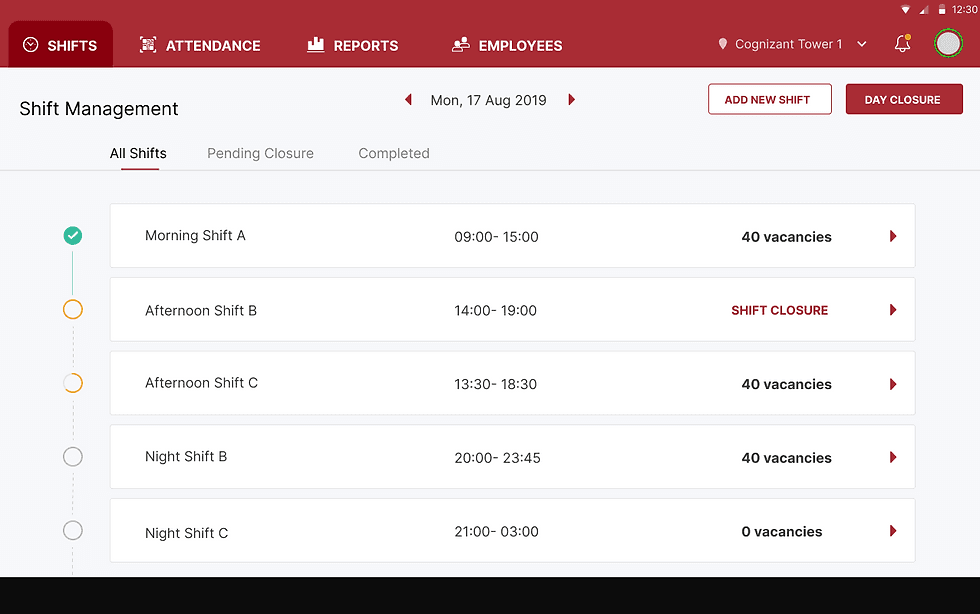
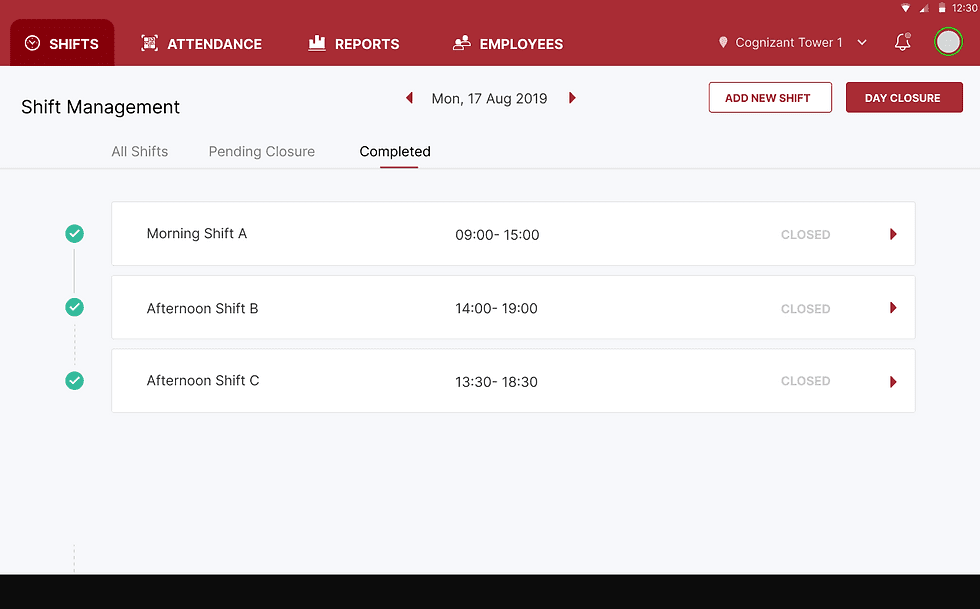
The Shift Management screen helps officers organize and track all shifts scheduled for the day. Because officers manage multiple overlapping shifts across different posts, the interface prioritizes visibility into shift status and staffing gaps.
Key design decisions
• Chronological shift list: Shifts are displayed in time order so officers can quickly understand the flow of the day and focus on the next shift requiring action.
• Vacancy visibility: Open positions are surfaced directly within each shift card, allowing officers to immediately identify staffing gaps without opening the shift details.
• Shift status indicators: Visual markers on the timeline show whether a shift is completed, in progress, or pending closure, helping officers track operational progress throughout the day.
The Shift Management screen helps officers organize and track all shifts scheduled for the day. Because officers manage multiple overlapping shifts across different posts, the interface prioritizes visibility into shift status and staffing gaps.
Key design decisions
• Chronological shift list: Shifts are displayed in time order so officers can quickly understand the flow of the day and focus on the next shift requiring action.
• Vacancy visibility: Open positions are surfaced directly within each shift card, allowing officers to immediately identify staffing gaps without opening the shift details.
• Shift status indicators: Visual markers on the timeline show whether a shift is completed, in progress, or pending closure, helping officers track operational progress throughout the day.
Shift roster
Shift roster
Description
Description
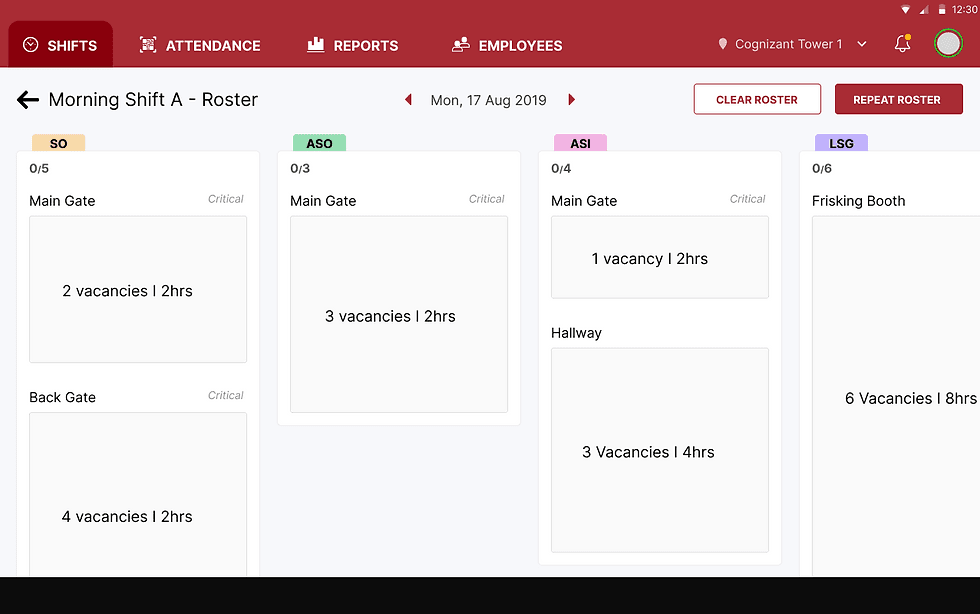
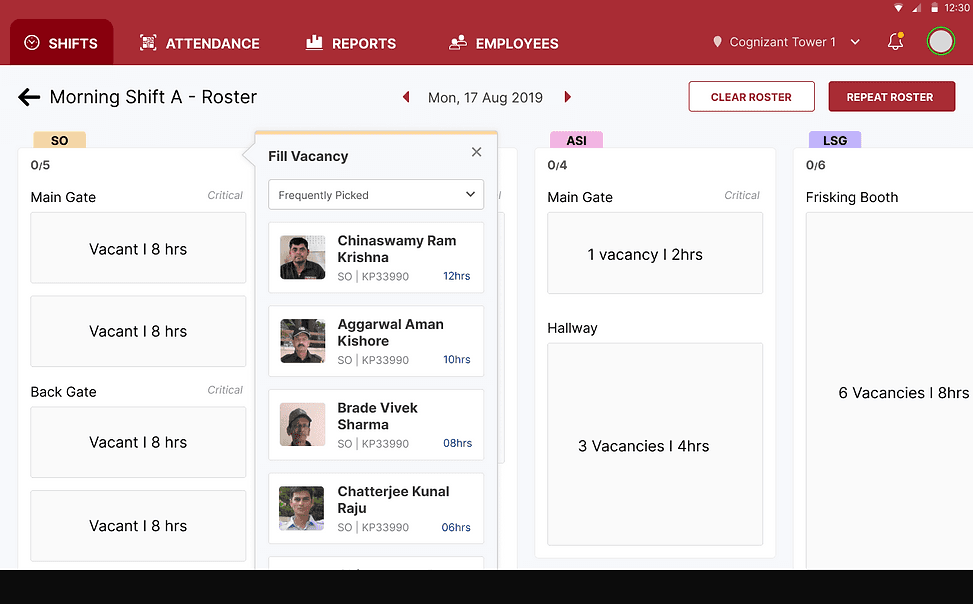
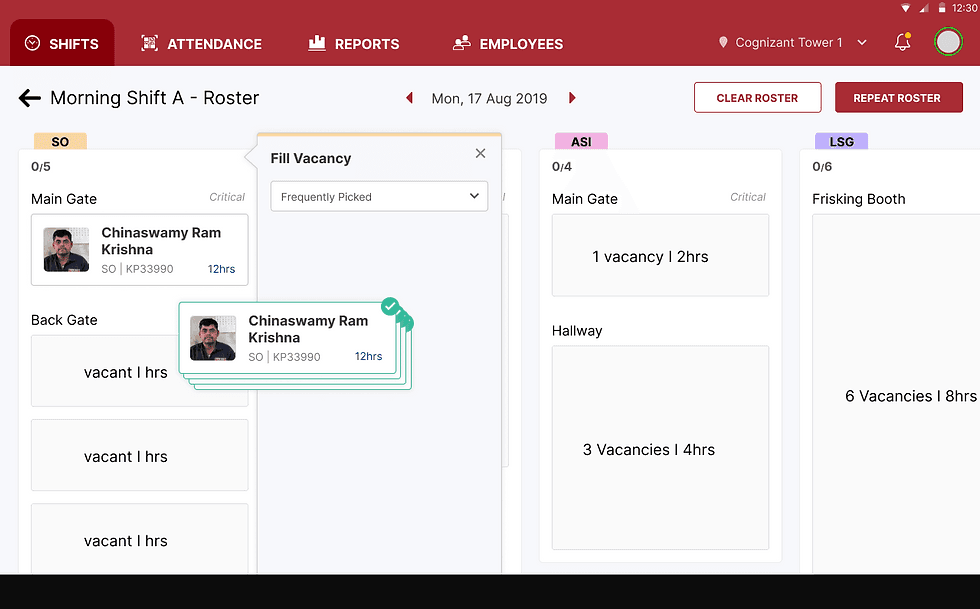
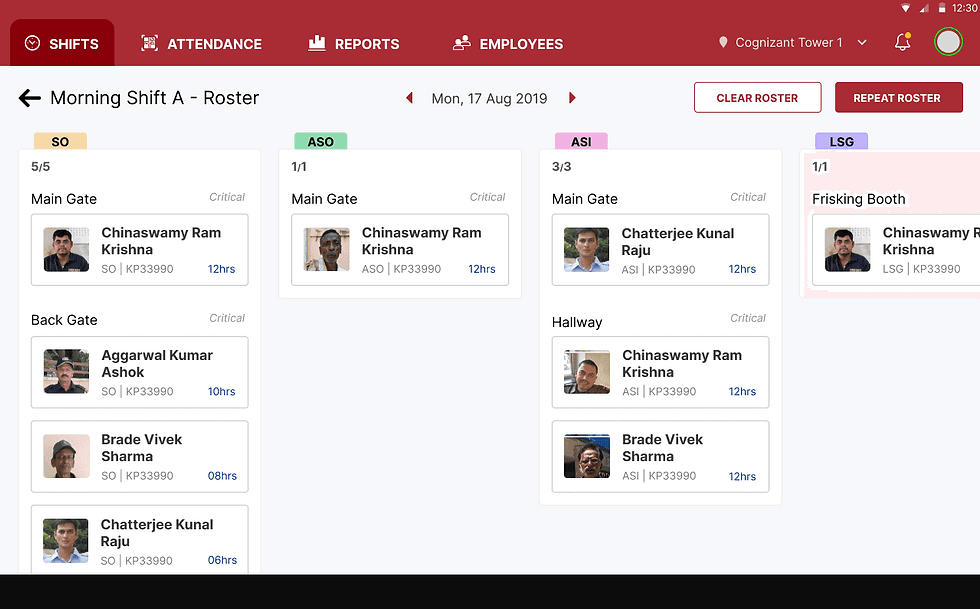
The Shift Roster screen allows officers to assign guards to specific posts within a shift. Each column represents a role, and each card represents a post requiring staffing. Because officers previously filled rosters manually, the design focuses on making vacancies visible and reducing the effort required to assign guards.
Key design decisions
• Vacancy-first layout: Posts display the number of vacancies and shift duration upfront, helping officers immediately understand where staffing gaps exist.
• Role-based grouping: Guards are organized by role (SO, ASO, ASI, etc.), ensuring officers only assign guards qualified for that position.
• Quick assignment workflow: Selecting a vacancy opens a contextual panel showing available guards, allowing officers to assign staff without leaving the roster view.
• Visual identification: Guard photos were included to support officers who often recognize guards visually rather than by employee ID.
• Reusable rosters: The Repeat Roster action allows officers to duplicate previous shift assignments, reducing repetitive work for recurring schedules.
The Shift Roster screen allows officers to assign guards to specific posts within a shift. Each column represents a role, and each card represents a post requiring staffing. Because officers previously filled rosters manually, the design focuses on making vacancies visible and reducing the effort required to assign guards.
Key design decisions
• Vacancy-first layout: Posts display the number of vacancies and shift duration upfront, helping officers immediately understand where staffing gaps exist.
• Role-based grouping: Guards are organized by role (SO, ASO, ASI, etc.), ensuring officers only assign guards qualified for that position.
• Quick assignment workflow: Selecting a vacancy opens a contextual panel showing available guards, allowing officers to assign staff without leaving the roster view.
• Visual identification: Guard photos were included to support officers who often recognize guards visually rather than by employee ID.
• Reusable rosters: The Repeat Roster action allows officers to duplicate previous shift assignments, reducing repetitive work for recurring schedules.
Shift Closure and Reporting
Shift Closure and Reporting
Description
Description
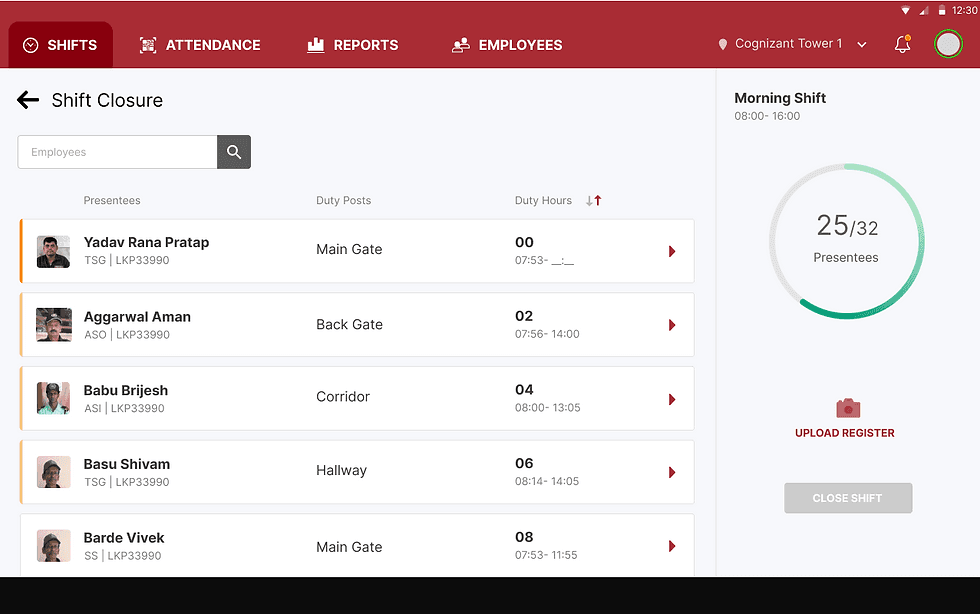
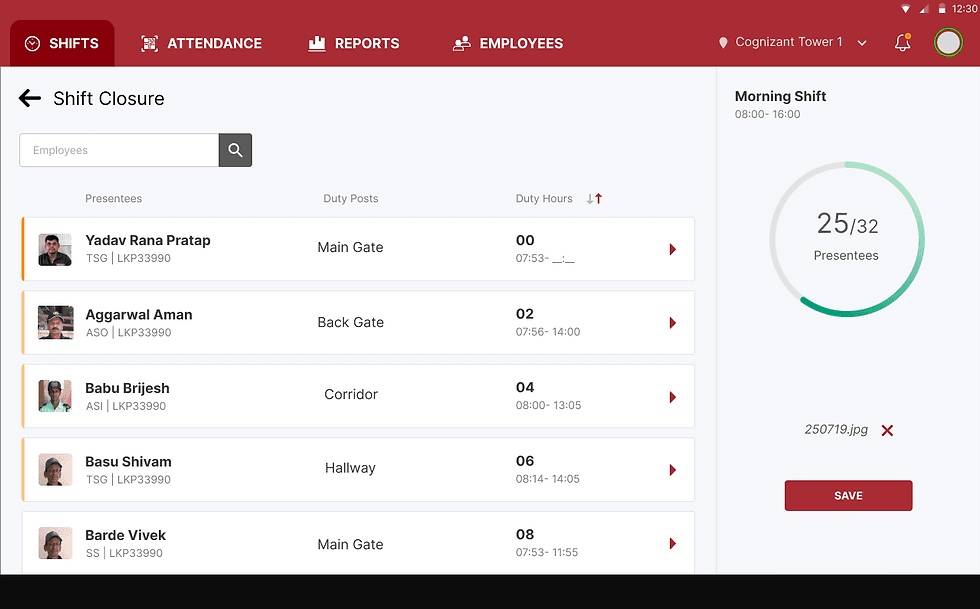
At the end of a shift, the officer closes the shift and generates a report. The system displays recorded punch-in and punch-out times, allowing the officer to verify attendance before finalizing the report. Once completed, reports can be exported and shared with clients for verification.
This workflow replaced the manual process of reviewing paper registers.
At the end of a shift, the officer closes the shift and generates a report. The system displays recorded punch-in and punch-out times, allowing the officer to verify attendance before finalizing the report. Once completed, reports can be exported and shared with clients for verification.
This workflow replaced the manual process of reviewing paper registers.
Impact
Impact
Six months after launch, the client reported significant improvements.
Six months after launch, the client reported significant improvements.
100% reduction in record tampering
100% reduction in record tampering
Digital attendance tracking prevented guards from falsifying records.
Digital attendance tracking prevented guards from falsifying records.
50% increase in unit adoption
50% increase in unit adoption
Users who learned the system began helping new officers adopt the application, accelerating rollout across branches.
Users who learned the system began helping new officers adopt the application, accelerating rollout across branches.
70% reduction in customer complaints
70% reduction in customer complaints
Improved shift visibility and faster reassignment helped officers address staffing shortages quickly.
Improved shift visibility and faster reassignment helped officers address staffing shortages quickly.
Improvement in user satisfaction
Improvement in user satisfaction
Security officers reported that shift management tasks became significantly easier compared to managing paper registers.
Security officers reported that shift management tasks became significantly easier compared to managing paper registers.
© 2026 Saumeel Sondur. All rights reserved.