Flowbuilder
Flowbuilder
Transforming an internal ETL system into a scalable, self-serve enterprise product
Research
Testing
System design
Web
Web
B2B
B2B
Enterprise SaaS
Enterprise SaaS
Healthcare
Healthcare
System design
Research
Project impact
37%
37%
Increase in satisfaction scores
78%
78%
Reduction in third party tool usage
30%
30%
Reduction in operating costs of internal users
What is Flowbuilder?
Flowbuilder is an enterprise ETL (Extract, Transform, Load) platform used within a healthcare analytics product suite. It enables teams to build data pipelines that power metrics, predictive models, and reporting tools used by clients.

When I joined, Flowbuilder was:
• Used only by internal specialists
• Dependent on external tools
• Difficult to scale across large datasets
• Risky for client-facing exposure
The business goal was clear
The business goal was clear
Transition Flowbuilder from an internal expert tool to a self-serve client product, while reducing operational costs.
Transition Flowbuilder from an internal expert tool to a self-serve client product, while reducing operational costs.
The Core Risks
Moving to self-serve introduced serious risk:
Misconfigured pipelines impacting client data
Poor traceability across 400+ pipelines
Heavy dependency on external SQL tools
Expensive compute usage (Remote Agents running unnecessarily)
Inconsistent patterns across the product suite
Moving to self-serve introduced serious risk:
Misconfigured pipelines impacting client data
Poor traceability across 400+ pipelines
Heavy dependency on external SQL tools
Expensive compute usage (Remote Agents running unnecessarily)
Inconsistent patterns across the product suite
The challenge was designing guardrails without reducing power.
The challenge was designing guardrails without reducing power.
My Role
Sole product designer over two quarters
Partnered with Sr. Director of Product and Engineering
Conducted user interviews and usability tests
Led IA restructuring
Defined new interaction models
Contributed foundational patterns during design system migration to Figma
Sole product designer over two quarters
Partnered with Sr. Director of Product and Engineering
Conducted user interviews and usability tests
Led IA restructuring
Defined new interaction models
Contributed foundational patterns during design system migration to Figma
Key design decisions
Reducing Configuration Risk (Controversial Interaction Shift)
Reducing Configuration Risk (Controversial Interaction Shift)
The problem
The original tool relied on freeform drag-and-drop node creation. Users frequently:
Created incomplete nodes
Left unused “dud” nodes
Used generic naming conventions
Introduced silent configuration errors
The original tool relied on freeform drag-and-drop node creation. Users frequently:
Created incomplete nodes
Left unused “dud” nodes
Used generic naming conventions
Introduced silent configuration errors
The decision
I replaced freeform creation with a structured wizard workflow:
Select node type
Define name + description
Connect dependencies
Configure
Review before commit
This was controversial.
It departed from industry-standard drag-and-drop ETL builders.
I replaced freeform creation with a structured wizard workflow:
Select node type
Define name + description
Connect dependencies
Configure
Review before commit
This was controversial.
It departed from industry-standard drag-and-drop ETL builders.
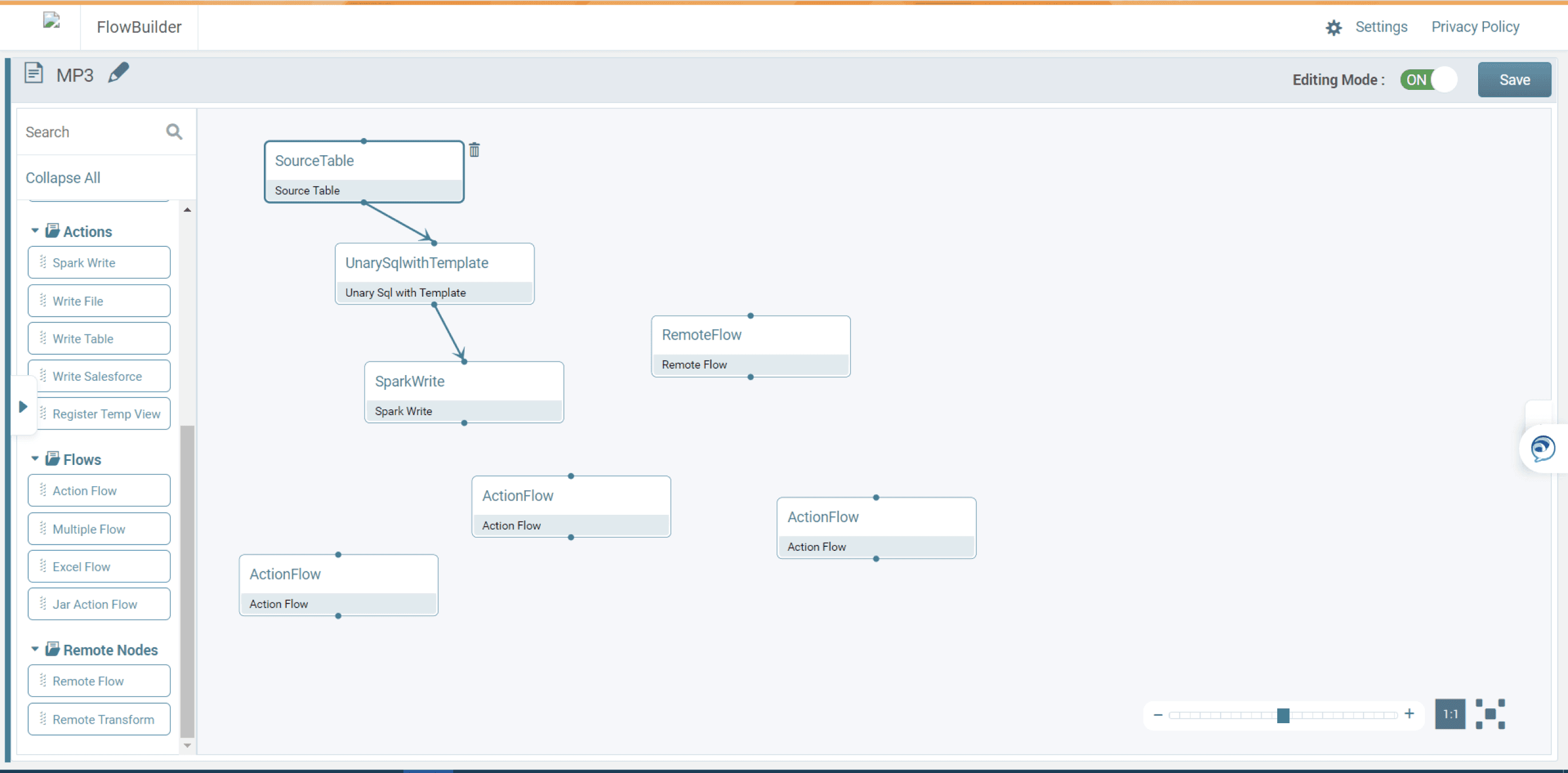
Legacy Canvas: Unstructured Node Creation
The original tool relied on freeform drag-and-drop node creation. Users frequently:
Created incomplete nodes
Left unused “dud” nodes
Used generic naming conventions
Introduced silent configuration errors
The original tool relied on freeform drag-and-drop node creation. Users frequently:
Created incomplete nodes
Left unused “dud” nodes
Used generic naming conventions
Introduced silent configuration errors
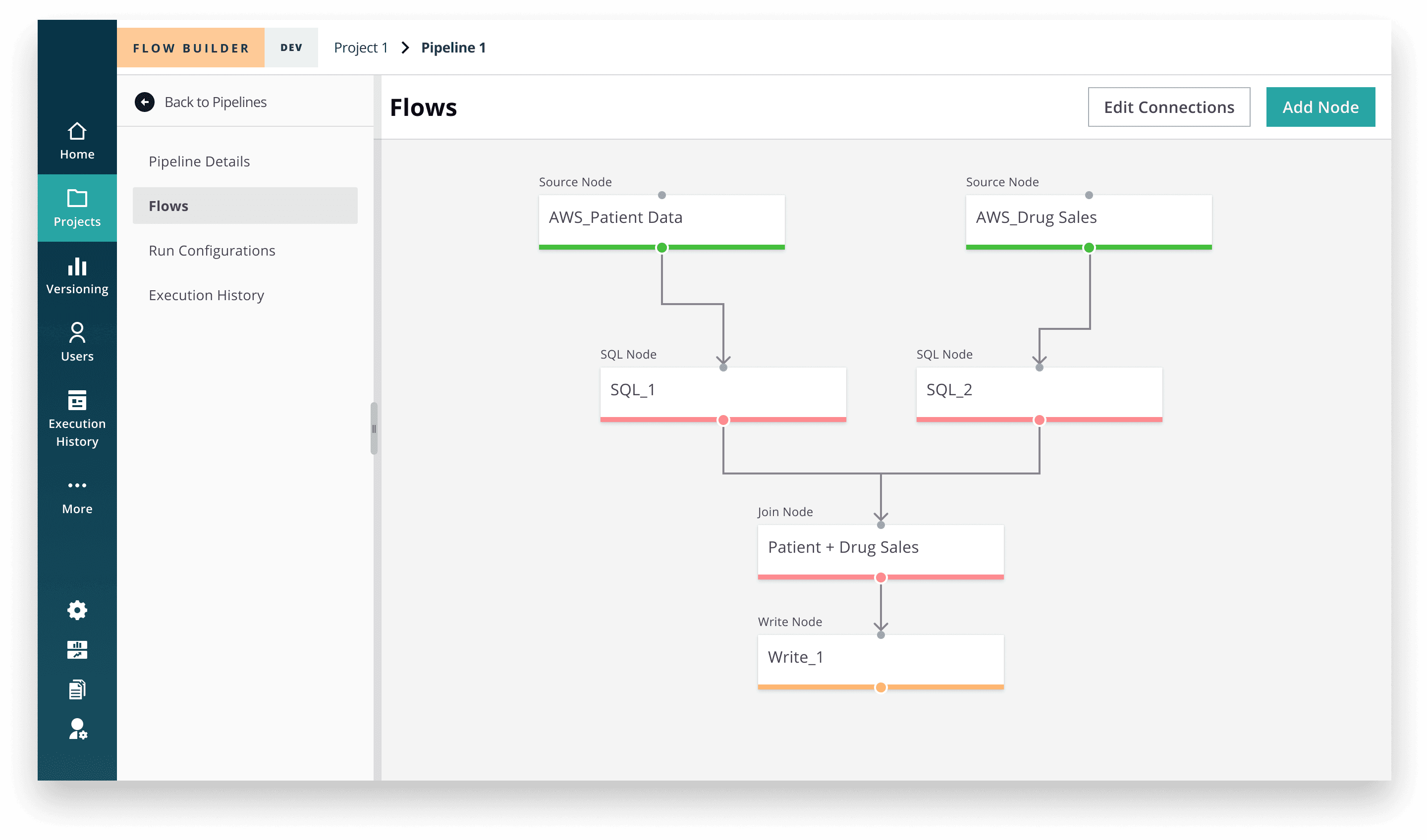
Redesigned Canvas: Guardrails and Clear Structure
The redesigned workspace introduced structured node creation and enforced configuration before placement. This reduced clutter, improved documentation through required naming, and increased overall pipeline traceability.
The redesigned workspace introduced structured node creation and enforced configuration before placement. This reduced clutter, improved documentation through required naming, and increased overall pipeline traceability.
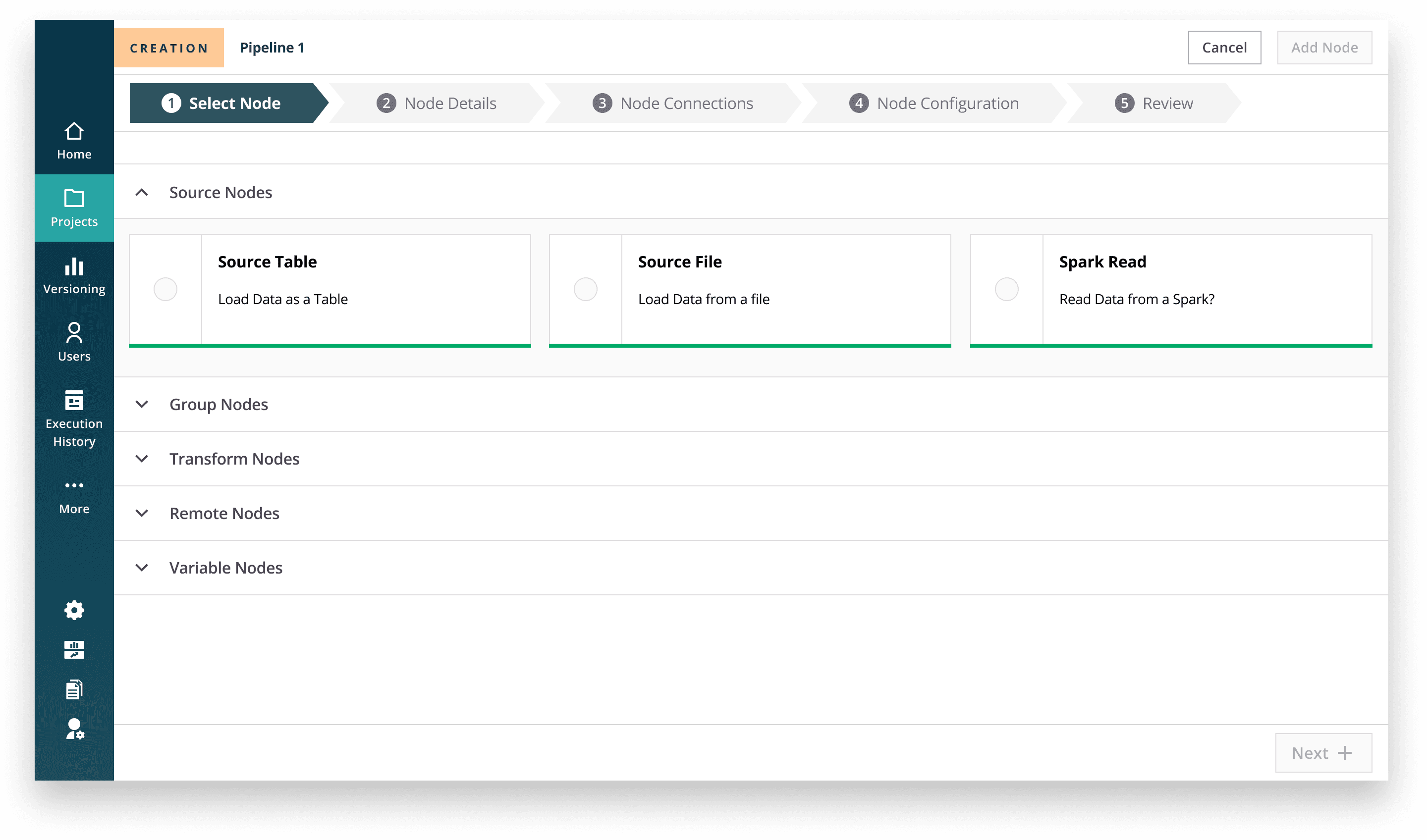
Guided Node Creation Workflow
Instead of freeform drag-and-drop, node creation follows a step-by-step workflow: define → configure → connect → review. This structure reduces accidental errors, enforces clarity, and supports safe self-serve usage for external clients.
While controversial due to its departure from industry norms, this approach significantly reduced misconfiguration during testing.
Instead of freeform drag-and-drop, node creation follows a step-by-step workflow: define → configure → connect → review. This structure reduces accidental errors, enforces clarity, and supports safe self-serve usage for external clients.
While controversial due to its departure from industry norms, this approach significantly reduced misconfiguration during testing.
Why It Worked
• Enforced naming discipline
• Reduced accidental misconfiguration
• Prevented clutter
• Encouraged documentation
• Enforced naming discipline
• Reduced accidental misconfiguration
• Prevented clutter
• Encouraged documentation
Reflection
In hindsight, I would explore a hybrid model to balance familiarity and guardrails.
The structured approach improved safety but reduced flexibility for expert users.
This was a tradeoff decision.
In hindsight, I would explore a hybrid model to balance familiarity and guardrails.
The structured approach improved safety but reduced flexibility for expert users.
This was a tradeoff decision.
Improving Discoverability at Scale (Hierarchy vs. Heterarchy)
The problem
Users struggled to find pipelines across large datasets (400+ per client). The initial proposal was a rigid hierarchical categorization model.
Users struggled to find pipelines across large datasets (400+ per client). The initial proposal was a rigid hierarchical categorization model.
My Insight
From research, I observed users searched pipelines across multiple dimensions: client type, transformation type, urgency, and ownership. A strict hierarchy would force a single classification.
From research, I observed users searched pipelines across multiple dimensions: client type, transformation type, urgency, and ownership. A strict hierarchy would force a single classification.
Hierarchy
Hierarchy
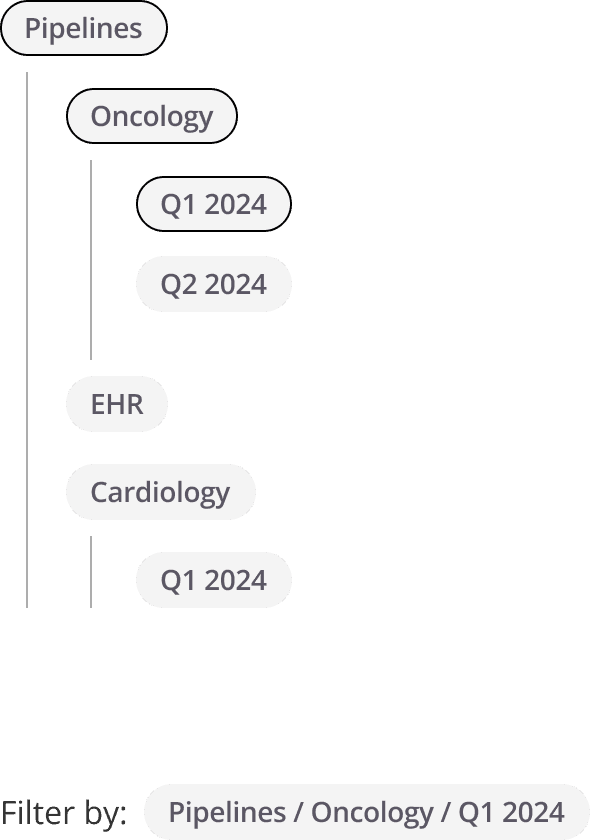
Limitations observed:
• Only one entry path per pipeline
• Difficult to scale when new metadata dimensions emerge
• Forces users to conform to organizational structure rather than task-based retrieval
Hierarchy works well when categories are stable and singular — but our users’ retrieval patterns were multi-dimensional.
Limitations observed:
Only one entry path per pipeline
Difficult to scale when new metadata dimensions emerge
Forces users to conform to organizational structure rather than task-based retrieval
Hierarchy works well when categories are stable and singular — but our users’ retrieval patterns were multi-dimensional.
Heterarchy
Heterarchy
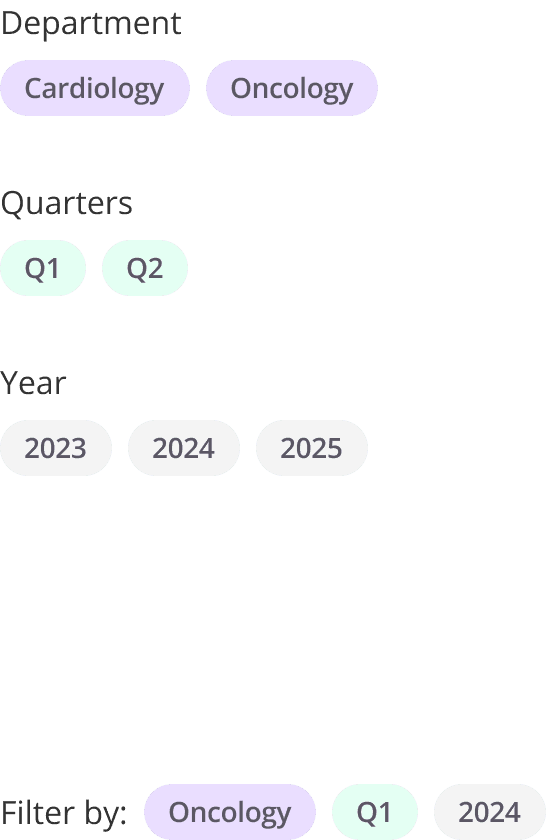
Pipelines were modeled as nodes with multiple attributes:
• Domain
• Data source
• Time period
• Client
• Business function
Users could filter pipelines by combining tags dynamically, allowing intersection-based retrieval.
This shifted discovery from path-based navigation to attribute-based filtering.
Pipelines were modeled as nodes with multiple attributes:
• Domain
• Data source
• Time period
• Client
• Business function
Users could filter pipelines by combining tags dynamically, allowing intersection-based retrieval.
This shifted discovery from path-based navigation to attribute-based filtering.
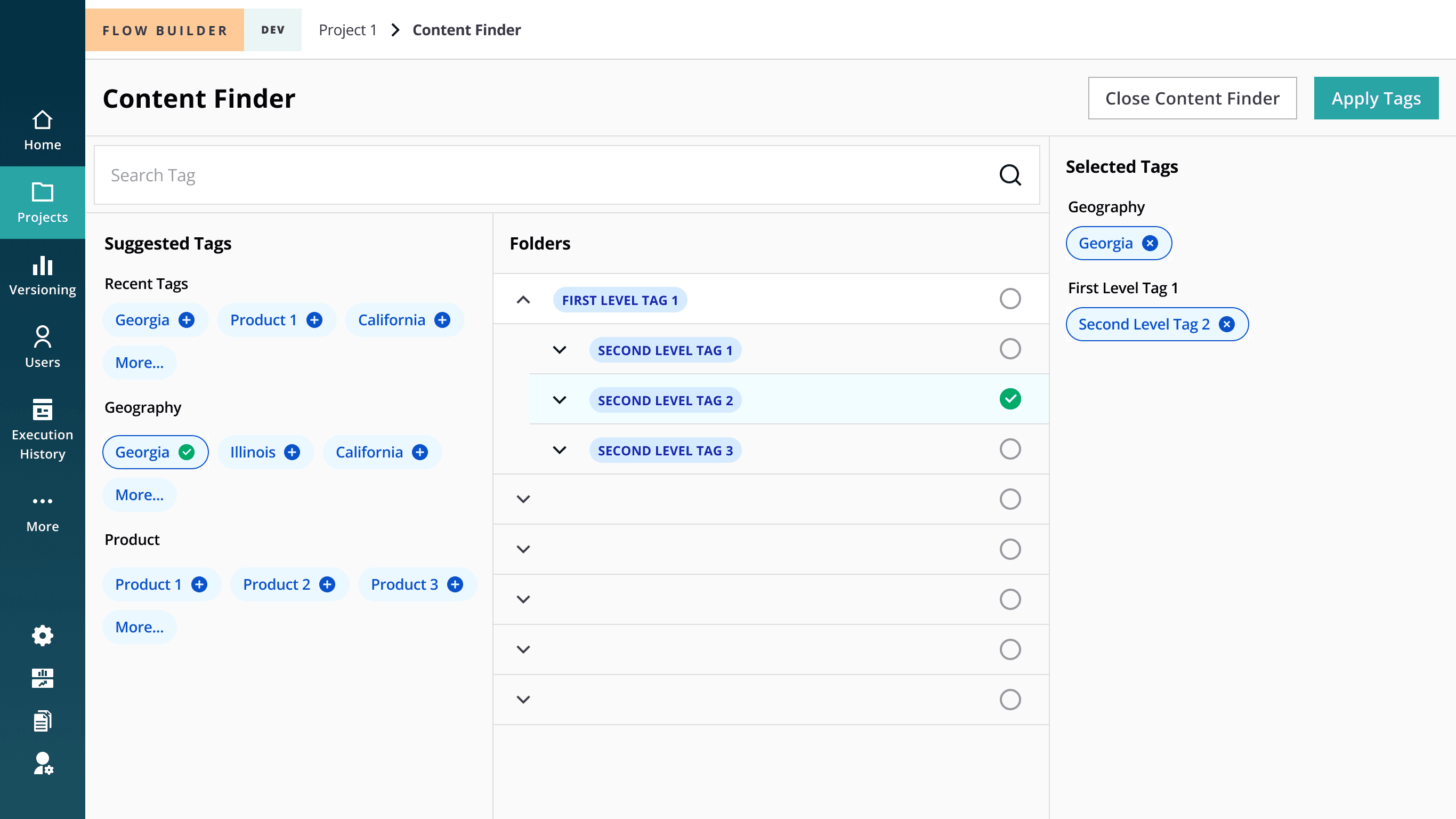
The decision
I advocated for a heterarchy-based tagging system, allowing pipelines to exist across multiple tag combinations. Paired with a dynamic content finder, users could filter by intersecting attributes rather than drill through rigid categories.
I advocated for a heterarchy-based tagging system, allowing pipelines to exist across multiple tag combinations. Paired with a dynamic content finder, users could filter by intersecting attributes rather than drill through rigid categories.
Eliminating Tool Fragmentation (Dedicated SQL Workspace)
Eliminating Tool Fragmentation (Dedicated SQL Workspace)
The problem
Users wrote SQL in external tools (e.g., IntelliJ) because Flowbuilder’s embedded editor was too limited.
This created:
Context switching
Inconsistent variable handling
Increased error potential
Users wrote SQL in external tools (e.g., IntelliJ) because Flowbuilder’s embedded editor was too limited.
This created:
Context switching
Inconsistent variable handling
Increased error potential
The decision
I designed a dedicated SQL configuration workspace with:
Expanded editor
Auto-suggestions
Integrated variable library
In-product testing support
I designed a dedicated SQL configuration workspace with:
Expanded editor
Auto-suggestions
Integrated variable library
In-product testing support
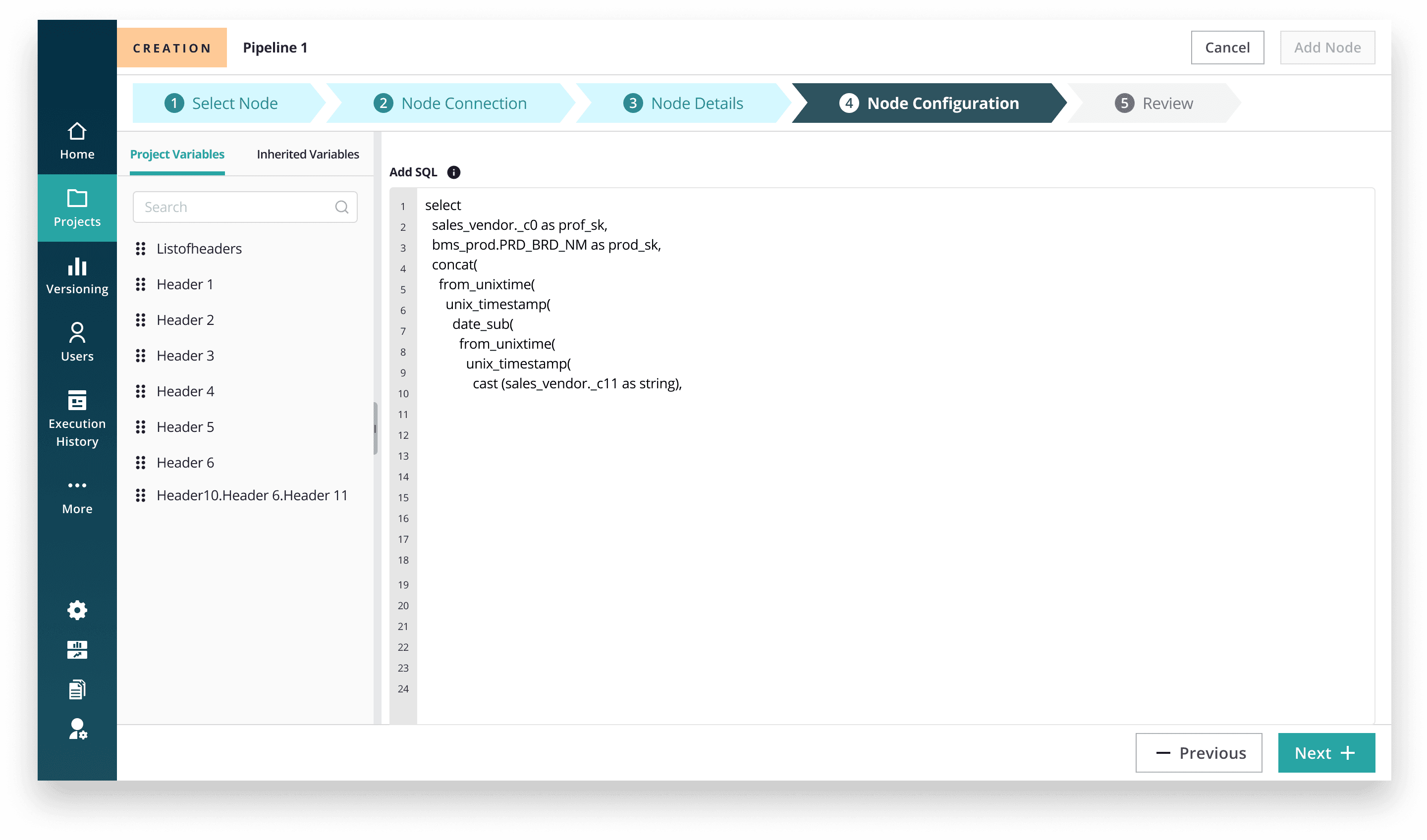
Outcome
78% reduction in third-party SQL tool usage
This moved Flowbuilder closer to being a self-contained product.
78% reduction in third-party SQL tool usage
This moved Flowbuilder closer to being a self-contained product.
Designing for Cost Awareness
Designing for Cost Awareness
The problem
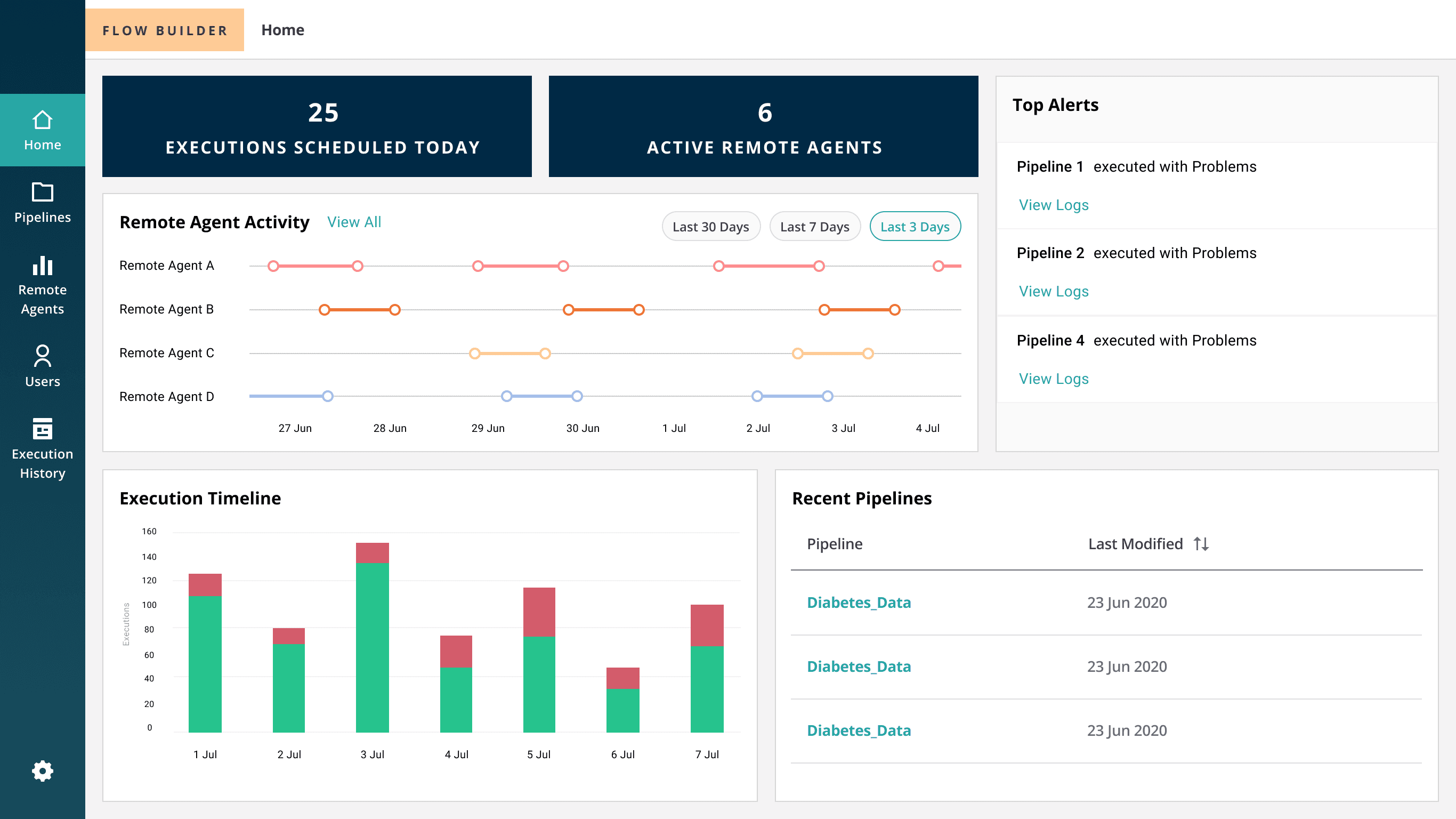
Remote agents provide compute power for pipeline execution, but there was limited visibility into their usage.
Internal teams often left agents running longer than necessary, leading to inflated operational costs. Cost drivers were buried across disconnected screens, making it difficult to identify inefficiencies quickly.
As the product moved toward self-serve, this lack of visibility posed financial risk.
Remote agents provide compute power for pipeline execution, but there was limited visibility into their usage.
Internal teams often left agents running longer than necessary, leading to inflated operational costs. Cost drivers were buried across disconnected screens, making it difficult to identify inefficiencies quickly.
As the product moved toward self-serve, this lack of visibility posed financial risk.
The decision
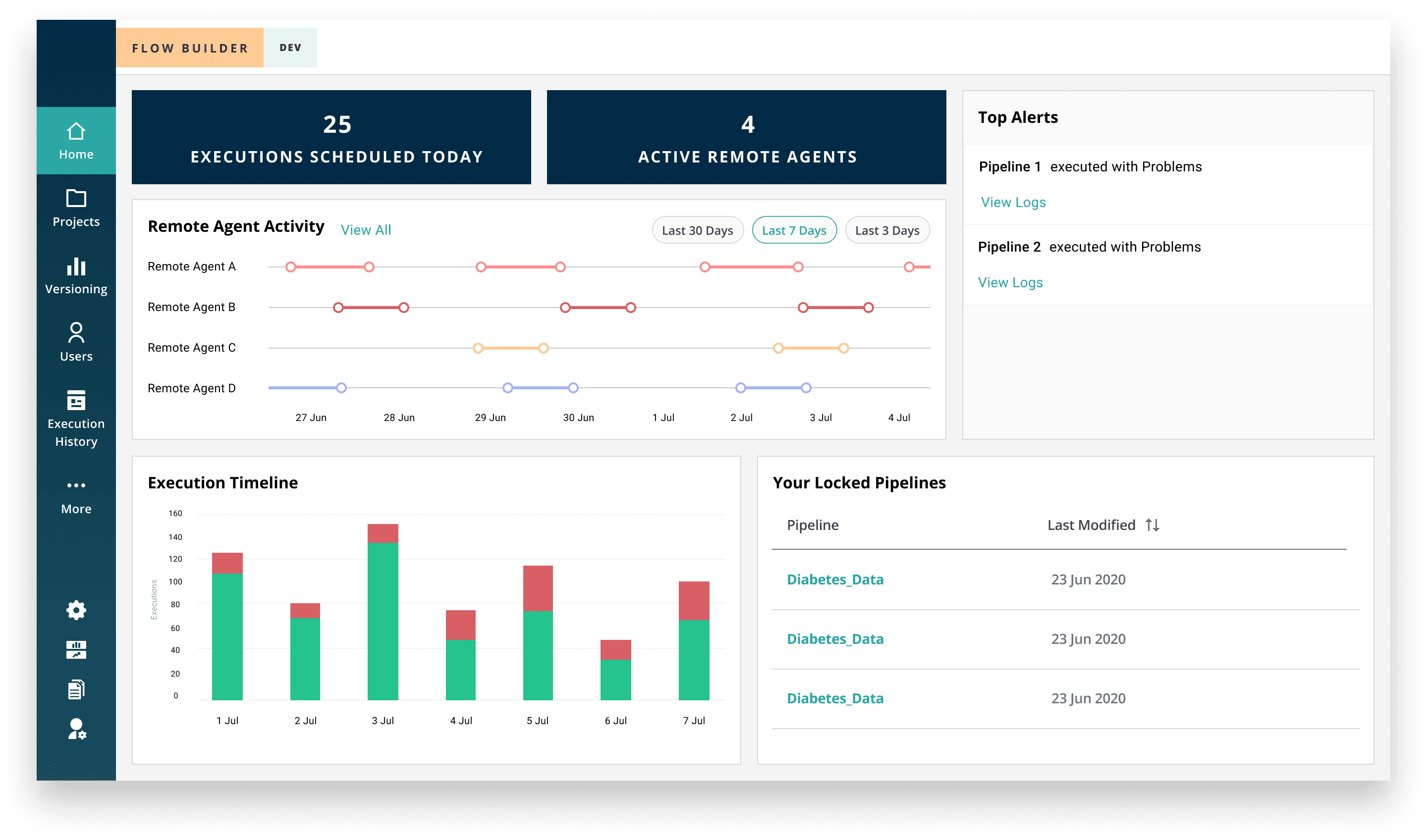
I introduced cost-awareness directly into the product experience by surfacing:
Real-time remote agent status
Execution summaries
High-priority alerts
Centralized visibility within the dashboard
Rather than treating cost monitoring as an operational afterthought, I embedded it into the primary workflow so administrators could proactively manage compute usage.
This aligned product behavior with business incentives.
I introduced cost-awareness directly into the product experience by surfacing:
Real-time remote agent status
Execution summaries
High-priority alerts
Centralized visibility within the dashboard
Rather than treating cost monitoring as an operational afterthought, I embedded it into the primary workflow so administrators could proactively manage compute usage.
This aligned product behavior with business incentives.
Outcome
Increased visibility into compute usage
Faster issue resolution
30% reduction in operational costs
Increased visibility into compute usage
Faster issue resolution
30% reduction in operational costs
Driving System-Level Consistency Across the Suite
Driving System-Level Consistency Across the Suite
The problem
Flowbuilder was not a standalone product — it existed within a broader healthcare analytics ecosystem.
However:
Navigation patterns differed across products
Core features (data connections, remote agents) lived in separate tools
There was no unified structural model across user roles
The design system was mid-transition from Axure to Figma
Without alignment, introducing self-serve functionality would amplify inconsistency and increase onboarding friction across the suite.
The risk wasn’t just usability — it was long-term scalability.
Flowbuilder was not a standalone product — it existed within a broader healthcare analytics ecosystem.
However:
Navigation patterns differed across products
Core features (data connections, remote agents) lived in separate tools
There was no unified structural model across user roles
The design system was mid-transition from Axure to Figma
Without alignment, introducing self-serve functionality would amplify inconsistency and increase onboarding friction across the suite.
The risk wasn’t just usability — it was long-term scalability.
The decision
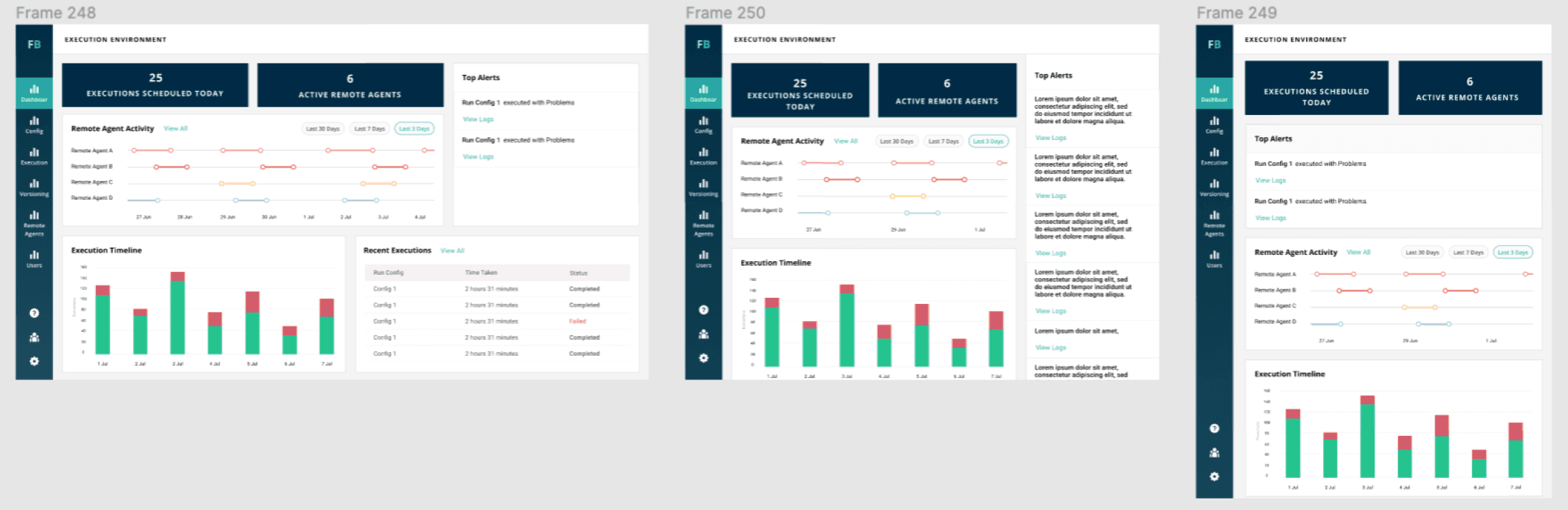
I approached Flowbuilder as part of a system rather than a single product.
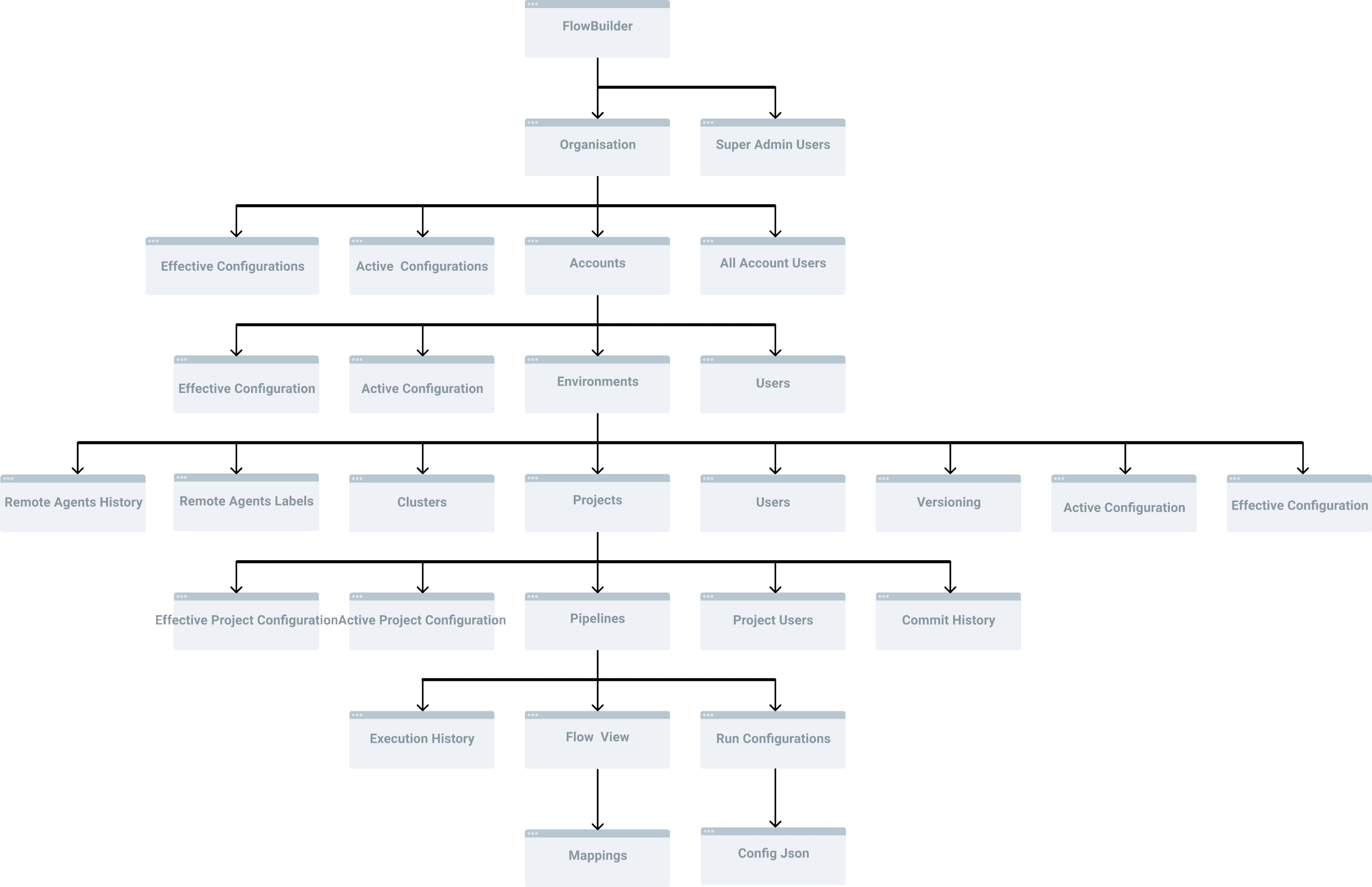
1. Role-Aligned Information Architecture (“Spine”)
I restructured the IA around a drill-down “spine” from Organization → Pipelines → Node Chains, mapping each layer to specific user roles.
This created predictable depth and controlled complexity exposure.
2. Feature Consolidation
I unified previously external tools (Data Connections, Remote Agents) into Flowbuilder to reduce fragmentation and strengthen product ownership.
3. Design System Foundation
During the migration to Figma, I helped define foundational patterns including:
Breadcrumb structure
Page layouts
Truncation behavior
Responsive rules
Flowbuilder became one of the early adopters, helping establish patterns reused across the suite.
I approached Flowbuilder as part of a system rather than a single product.
1. Role-Aligned Information Architecture (“Spine”)
I restructured the IA around a drill-down “spine” from Organization → Pipelines → Node Chains, mapping each layer to specific user roles.
This created predictable depth and controlled complexity exposure.
2. Feature Consolidation
I unified previously external tools (Data Connections, Remote Agents) into Flowbuilder to reduce fragmentation and strengthen product ownership.
3. Design System Foundation
During the migration to Figma, I helped define foundational patterns including:
Breadcrumb structure
Page layouts
Truncation behavior
Responsive rules
Flowbuilder became one of the early adopters, helping establish patterns reused across the suite.
Outcome
Reduced cross-product friction
Improved navigation predictability
Strengthened internal design consistency
Created scalable structure for future feature expansion
This work extended beyond a single feature redesign — it established structural alignment across a multi-product enterprise ecosystem.
Reduced cross-product friction
Improved navigation predictability
Strengthened internal design consistency
Created scalable structure for future feature expansion